二次システムの特性
OctaveのGUIがいい感じになったので、制御を体感してもらうために、簡単なサンプルを示します。
二次標準形式の時間応答
伝達関数 $$G(s)=\frac{{\omega_n}^2}{s^2+2\zeta\omega_n s +{\omega_n}^2}$$ の時間応答は 減衰係数$\zeta$と固有角周波数$\omega_n$の値で大きく変化します。
スライダーを動かすと$\zeta,\omega_n$が変化し、それに応じた時間応答を表示します。 観察してください。
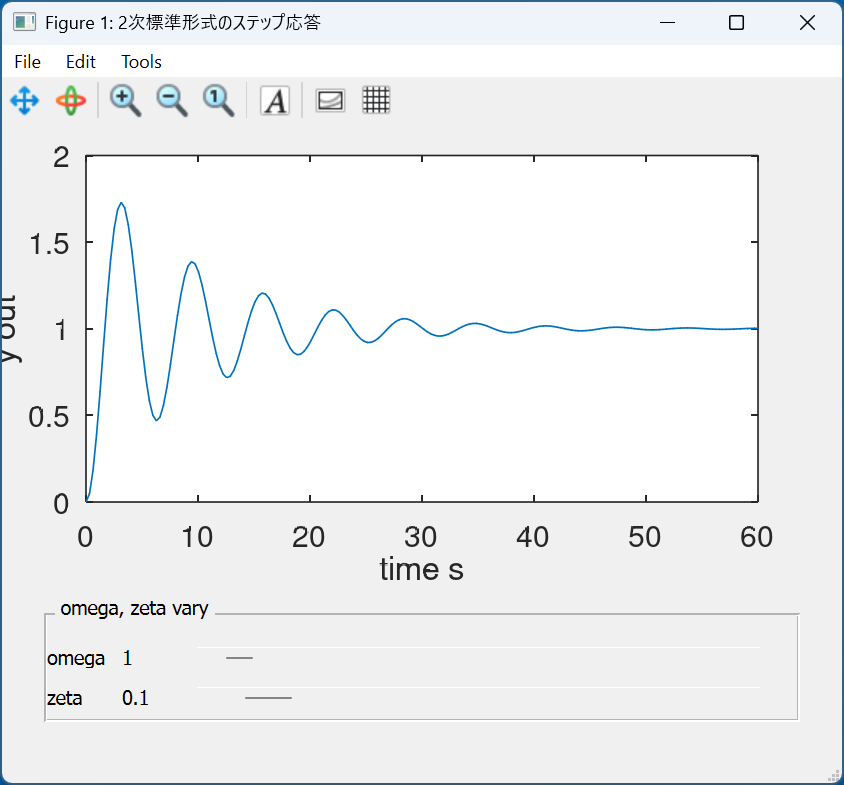
ソースをDLまたはclipboardの内容を保存して、手元のPCでOctaveを起動して確認してください。
  1clear all
  2close all
  3clc
  4
  5
  6pkg load control
  7
  8h.fnc= @(w,z) tf([w*w],[1 2*z*w w*w]);
  9h.gf=figure("position",[50 50 560 420],"name","2次標準形式のステップ応答");
 10%defaultは[300 200 560 420].4:3
 11
 12
 13function update_plot(obj, init=false)
 14    hs=guidata(obj);
 15    replot=false;
 16    recalc=false;
 17    % getcallbackobject:
 18    ## gcbo holds the handle of the control
 19    switch (gcbo)
 20      case {hs.zeta_sl}
 21        zeta_gui=get(gcbo, "value");
 22        replot=true;
 23        recalc=true;
 24        omega_gui=get(hs.omega_sl,"value");
 25        set(hs.zeta_value,"string",num2str(zeta_gui));
 26      case {hs.omega_sl}
 27        omega_gui=get(gcbo, "value");
 28        replot=true;
 29        recalc=true;
 30        zeta_gui=get(hs.zeta_sl,"value");
 31        set(hs.omega_value,"string",num2str(omega_gui));
 32    end
 33
 34    if(recalc==true)
 35        omega_n=omega_gui;
 36        zeta=zeta_gui;
 37        G=hs.fnc(omega_n,zeta);
 38        [y t]=step(G);
 39    end
 40
 41    if(replot==true)
 42        hs.plot=plot(t,y);
 43        set(gca,"xlabel","time s","ylabel", "y out","fontsize",20);
 44        %guidata (obj, hs);
 45    end
 46
 47end
 48
 49h.p=uipanel(
 50    "title","\omega, \zeta vary",
 51    "position",[0.05 0.05 0.9 0.2]);
 52
 53zeta_ini=0.1;
 54omega_ini=1;
 55
 56h.zeta_disp=uicontrol(
 57    "parent",h.p,
 58    "style","text",
 59    "units", "normalized",
 60    "string","zeta",
 61    "horizontalalignment", "left",
 62    "position", [0 0.1 0.1 0.2]);
 63
 64h.zeta_value=uicontrol(
 65    "parent",h.p,
 66    "style","text",
 67    "units", "normalized",
 68    "string",num2str(zeta_ini),
 69    "horizontalalignment", "left",
 70    "position", [0.1 0.1 0.1 0.2]);
 71
 72h.zeta_sl=uicontrol(
 73    "parent",h.p,
 74    "style","slider",
 75    "units", "normalized",
 76    "string", "slider",
 77    "value", zeta_ini,
 78    "max",2,
 79    "min",0.001,
 80    "sliderstep",[0.01 0.1],
 81    "horizontalalignment", "left",
 82    "position", [0.2 0.1 0.75 0.2],
 83    "callback", @update_plot );
 84
 85h.omega_disp=uicontrol(
 86    "parent",h.p,
 87    "style","text",
 88    "units", "normalized",
 89    "string","omega",
 90    "horizontalalignment", "left",
 91    "position", [0 0.5 0.1 0.2]);
 92
 93h.omega_value=uicontrol(
 94    "parent",h.p,
 95    "style","text",
 96    "units", "normalized",
 97    "string",num2str(omega_ini),
 98    "horizontalalignment", "left",
 99    "position", [0.1 0.5 0.1 0.2]);
100
101
102h.omega_sl=uicontrol(
103    "parent",h.p,
104    "style","slider",
105    "units", "normalized",
106    "string", "slider",
107    "value", omega_ini,
108    "max",100,
109    "min",0.1,
110    "sliderstep",[0.001 0.01],
111    "position", [0.2 0.5 0.75 0.2],
112    "callback", @update_plot );
113
114
115set (h.gf, "color", get(h.gf, "defaultuicontrolbackgroundcolor"));
116
117h.ax=axes(h.gf,"position",[0.1 0.4 0.8 0.55]);
118
119%初期描画用伝達関数step応答
120G=h.fnc(omega_ini,zeta_ini);
121[y t]=step(G);
122h.plot=plot(t,y);
123set(gca,"xlabel","time s","ylabel", "y out","fontsize",20);
124
125guidata(h.gf,h);% guidata(figure handle,datacontainer)
126%これがなかったらerror : matrix cannot be indexed with . になる
127
128update_plot(h.gf,true);
極位置と応答特性の関係(その1)
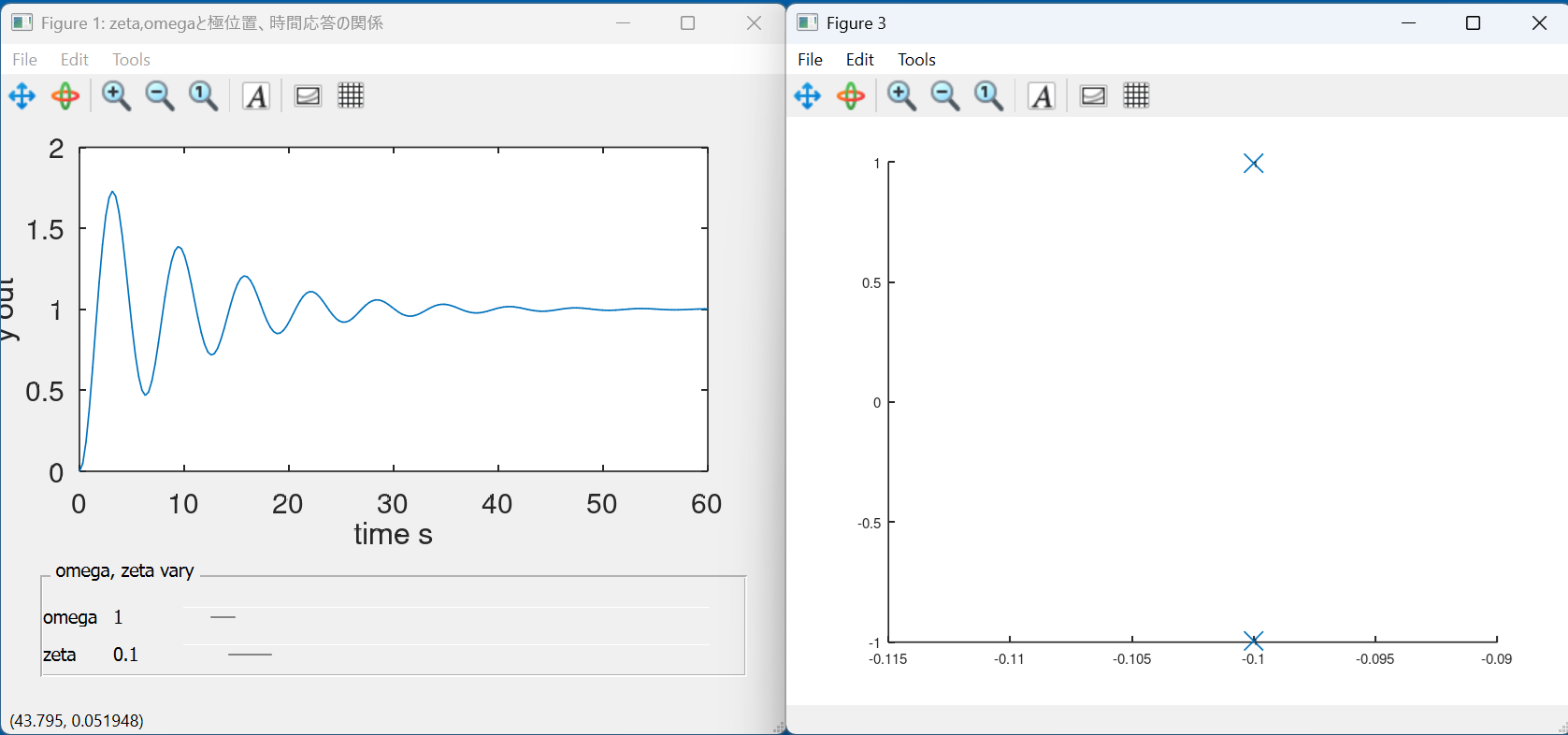
上記伝達関数の時間応答と、極位置の関係を示します。
  1
  2clear all
  3close all
  4clc
  5
  6%graphics_toolkit(qt)%なくてもいい,qtがdefaultになっている
  7
  8pkg load control
  9
 10h.fnc= @(w,z) tf([w*w],[1 2*z*w w*w]);
 11%h.gf=figure("position",[50 100 700 600],"name","zeta,omegaと極位置、時間応答の関係");
 12h.gf=figure("position",[10 50 560 420],"name","zeta,omegaと極位置、時間応答の関係");
 13%defaultは[300 200 560 420].4:3
 14
 15function complex_plot(pl)
 16global count=1;
 17    [r c]=size(pl);
 18    for i=1:r
 19        x(i)=real(pl(i));
 20        y(i)=imag(pl(i));
 21    end
 22    hold on
 23    plot(x,y,"x");
 24    text(x,y,num2str(count));
 25    count=count+1;
 26end
 27
 28
 29
 30function update_plot(obj, init=false)
 31    hs=guidata(obj);
 32    replot=false;
 33    recalc=false;
 34
 35    % get_call_back_object:
 36    ## gcbo holds the handle of the control
 37    switch (gcbo)
 38      case {hs.zeta_sl}
 39        zeta_gui=get(gcbo, "value");
 40        replot=true;
 41        recalc=true;
 42        omega_gui=get(hs.omega_sl,"value");
 43        set(hs.zeta_value,"string",num2str(zeta_gui));
 44      case {hs.omega_sl}
 45        omega_gui=get(gcbo, "value");
 46        replot=true;
 47        recalc=true;
 48        zeta_gui=get(hs.zeta_sl,"value");
 49        set(hs.omega_value,"string",num2str(omega_gui));
 50    end
 51
 52    if(recalc==true)
 53        omega_n=omega_gui;
 54        zeta=zeta_gui;
 55        G=hs.fnc(omega_n,zeta);
 56        [y t]=step(G);
 57    end
 58
 59    if(replot==true)
 60        figure(1)
 61        hs.plot=plot(t,y);
 62        %        figure(2)
 63        %plot(t,y);
 64        set(gca,"xlabel","time s","ylabel","y out","fontsize",20);
 65        %guidata (obj, hs);%なくてもいい?!
 66
 67        figure(3)
 68        [pole,zero]=pzmap(G);
 69        complex_plot(pole)
 70    end
 71
 72end
 73
 74h.p=uipanel(
 75    "title","\omega, \zeta vary",
 76    "position",[0.05 0.05 0.9 0.2]);
 77
 78zeta_ini=0.1;
 79omega_ini=1;
 80
 81h.zeta_disp=uicontrol(
 82    "parent",h.p,
 83    "style","text",
 84    "units", "normalized",
 85    "string","zeta",
 86    "horizontalalignment", "left",
 87    "position", [0 0.1 0.1 0.2]);
 88
 89h.zeta_value=uicontrol(
 90    "parent",h.p,
 91    "style","text",
 92    "units", "normalized",
 93    "string",num2str(zeta_ini),
 94    "horizontalalignment", "left",
 95    "position", [0.1 0.1 0.1 0.2]);
 96
 97h.zeta_sl=uicontrol(
 98    "parent",h.p,
 99    "style","slider",
100    "units", "normalized",
101    "string", "slider",
102    "value", zeta_ini,
103    "max",2,
104    "min",0.001,
105    "sliderstep",[0.01 0.1],
106    "horizontalalignment", "left",
107    "position", [0.2 0.1 0.75 0.2],
108    "callback", @update_plot );
109
110h.omega_disp=uicontrol(
111    "parent",h.p,
112    "style","text",
113    "units", "normalized",
114    "string","omega",
115    "horizontalalignment", "left",
116    "position", [0 0.5 0.1 0.2]);
117
118h.omega_value=uicontrol(
119    "parent",h.p,
120    "style","text",
121    "units", "normalized",
122    "string",num2str(omega_ini),
123    "horizontalalignment", "left",
124    "position", [0.1 0.5 0.1 0.2]);
125
126
127h.omega_sl=uicontrol(
128    "parent",h.p,
129    "style","slider",
130    "units", "normalized",
131    "string", "slider",
132    "value", omega_ini,
133    "max",100,
134    "min",0.1,
135    "sliderstep",[0.001 0.01],
136    "position", [0.2 0.5 0.75 0.2],
137    "callback", @update_plot );
138
139
140set (h.gf, "color", get(h.gf, "defaultuicontrolbackgroundcolor"));
141
142h.ax=axes(h.gf,"position",[0.1 0.4 0.8 0.55]);
143
144%初期描画用伝達関数step応答
145G=h.fnc(omega_ini,zeta_ini);
146[y t]=step(G);
147h.plot=plot(t,y);
148set(gca,"xlabel","time s","ylabel", "y out","fontsize",20);
149
150%figure(3,"position",[750,100,640,480])
151figure(3,"position",[570,50,560,420])
152%defaultは[300 200 560 420].4:3
153[pole,zero]=pzmap(G);
154
155complex_plot(pole);
156
157guidata(h.gf,h);
158%これがなかったらerror : matrix cannot be indexed with . になる
159
160update_plot(h.gf,true);
極位置と応答特性の関係(その2)
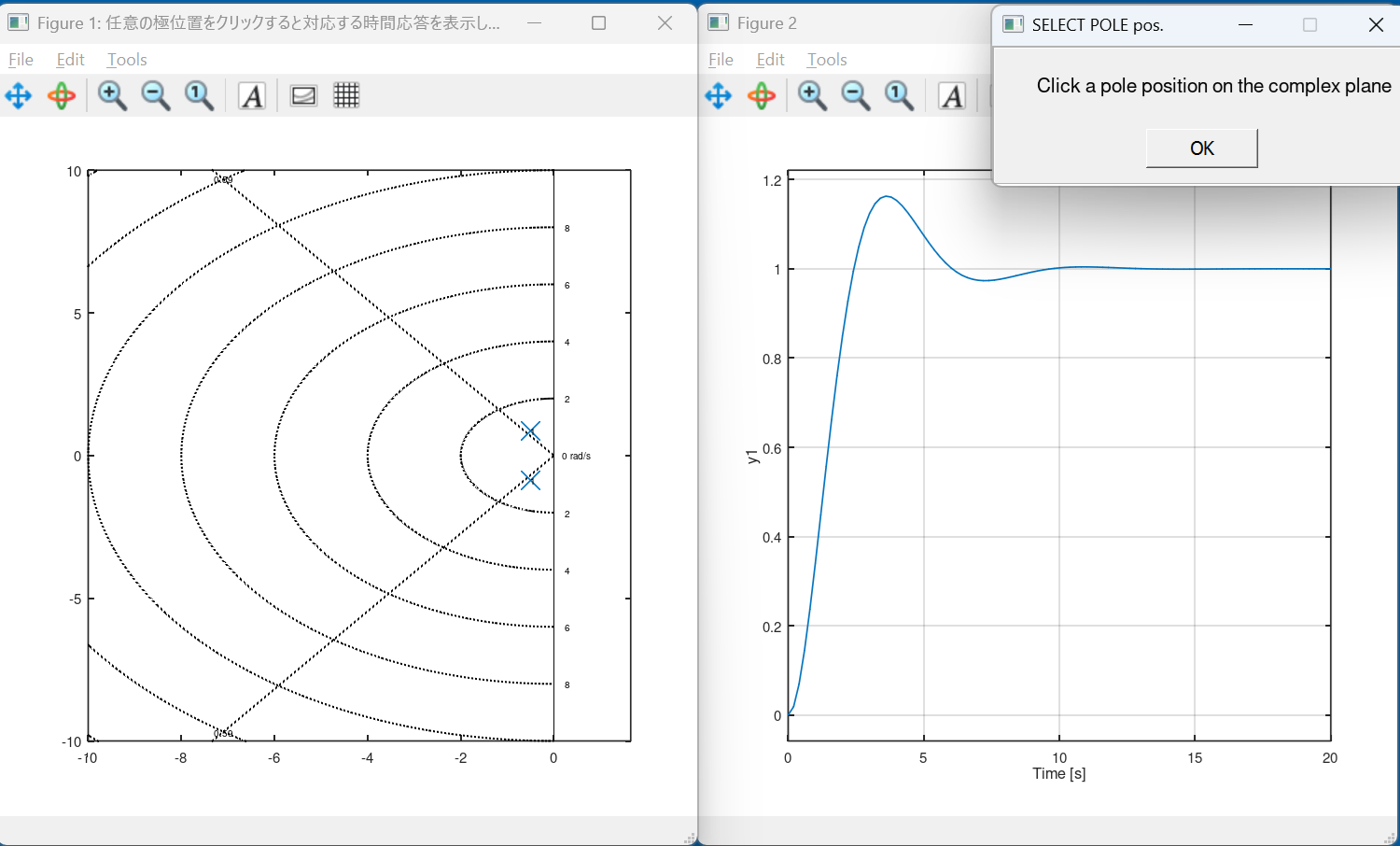
複素平面上の任意の点をクリックすれば、そこを極とする二次遅れ要素の時間応答 を示します。
 1clear all
 2close all
 3clc
 4
 5pkg load control
 6
 7function step_cal(x,y)
 8fnc= @(p1,p2) zpk([],[p1,p2],p1*p2);
 9
10    p1=x+j*y;
11    p2=x-j*y;
12    G=fnc(p1,p2);
13    figure(2)
14    step(G);
15
16end
17
18function complex_plot(pl)
19    count=1;
20    [r c]=size(pl);
21    for i=1:r
22        x(i)=real(pl(i));
23        y(i)=imag(pl(i));
24    end
25    hold on
26    plot(x,y,"x");
27    text(x,y,num2str(count));
28    %    count=count+1;
29end
30
31figure(1,"position",[100,100,500,500],"name","任意の極位置をクリックすると対応する時間応答を表示します。")
32axis([-10 1 -10 10])
33sgrid(0.5912,[])%zeta,omega
34                %daspect([1 1])
35
36G=tf(1,[1 1 1]);
37figure(2,"position",[600,100,500,500])
38step(G)
39[pole zero]=pzmap(G);
40figure(1)
41complex_plot(pole);
42
43count=2;
44
45H=msgbox("Click a pole position on the complex plane","SELECT POLE pos.");
46%H=msgbox("極位置として複素平面上の点をクリックしてください","極位置と時間応答");
47uiwait(H);
48
49while(1)
50    figure(1)
51    [x y btn]=ginput(1);
52    hold on
53    if(btn==1)
54        plot(x,y,"x")
55        plot(x,-y,"x");
56        text(x,y,num2str(count));
57        count=count+1;
58        step_cal(x,y);
59    else
60        break% error対策: text: invalid combination of points and text strings
61    end
62
63end
64
65close all
極位置と応答特性の関係(その3)
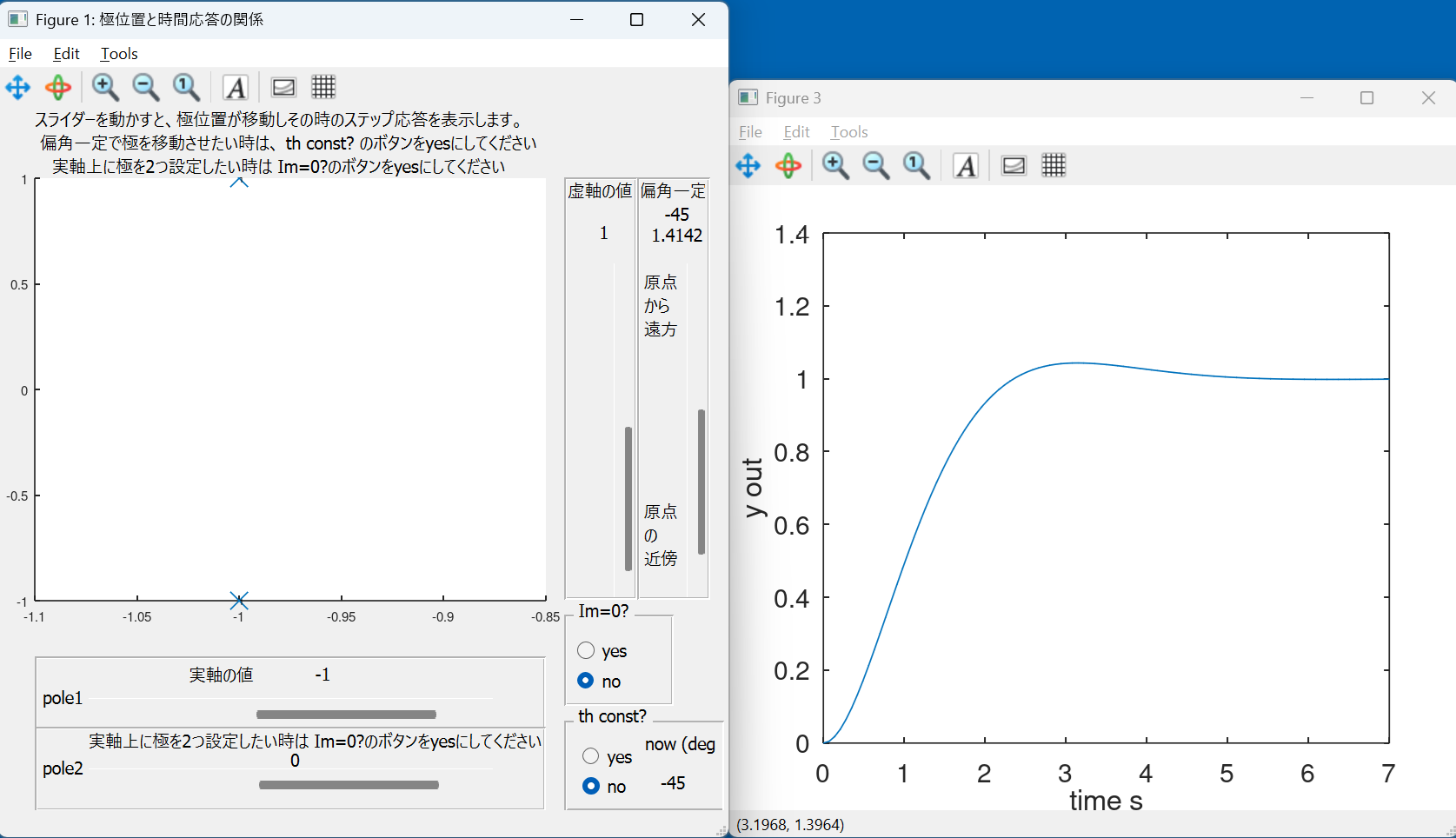
スライダーを動かすと極位置が変化し、その極位置を有する 二次遅れ要素の時間応答を表示します。
th_const?をnoのままでは実軸/虚数軸固定、
th_const?をyesとすると、偏角一定で、極位置が変化します。
  1% 極位置指定からstep応答をみる
  2
  3clear all
  4close all
  5clc
  6
  7pkg load control
  8
  9h.fnc= @(p1,p2) zpk([],[p1,p2],p1*p2);
 10h.gf=figure("position",[10 100 560 540],"name","極位置と時間応答の関係");
 11%defaultは[300 200 560 420].4:3
 12
 13function complex_plot(pl)
 14global     count=1;
 15
 16[r c]=size(pl);
 17    for i=1:r
 18        x(i)=real(pl(i));
 19        y(i)=imag(pl(i));
 20    end
 21    figure(1)
 22    hold on
 23    plot(x,y,"x");
 24    text(x,y,num2str(count));
 25    count=count+1;
 26    %    sgrid(zeta_com,[])
 27end
 28
 29
 30
 31function update_plot(obj, init=false)
 32    hs=guidata(obj);
 33    replot=false;
 34    recalc=false;
 35
 36    IMG_ZERO=get(hs.rb1,"value");
 37    TH_CNST=get(hs.gp2_rb1,"value");
 38
 39    real_part_gui=get(hs.real_part_sl,"value");
 40    imag_part_gui=get(hs.imag_part_sl,"value");
 41    real_part2_gui=get(hs.real_part2_sl,"value");
 42
 43    th_cnst_gui=get(hs.th_cnst_sl,"value");
 44    dist=sqrt(real_part_gui*real_part_gui+imag_part_gui*imag_part_gui);
 45
 46    if(IMG_ZERO==false)
 47        th_angle=atan(imag_part_gui/real_part_gui)*180/pi;
 48    end
 49
 50    % get_call_back_object:
 51    ## gcbo holds the handle of the control
 52    switch (gcbo)
 53      case {hs.real_part_sl}
 54        real_part_gui=get(gcbo, "value");
 55        set(hs.real_part_value,"string",num2str(real_part_gui));
 56        replot=true;
 57        recalc=true;
 58      case {hs.imag_part_sl}
 59        imag_part_gui=get(gcbo, "value");
 60        set(hs.imag_part_value,"string",num2str(imag_part_gui));
 61        replot=true;
 62        recalc=true;
 63      case {hs.real_part2_sl}
 64        real_part2_gui=get(gcbo, "value");
 65        set(hs.real_part2_value,"string",num2str(real_part2_gui));
 66        replot=true;
 67        recalc=true;
 68
 69      case {hs.rb1} % buttongroupは両方イベント起こるので場合分け必要
 70        if ( (get(hs.rb1, "value")==true) && (get(hs.rb2, "value")==false) )
 71            IMG_ZERO=true;
 72        else
 73            IMG_ZERO=false;
 74        end
 75        replot=true;
 76        recalc=true;
 77      case {hs.rb2}
 78        if ( (get(hs.rb2, "value")==true) && (get(hs.rb1, "value")==false) )
 79            IMG_ZERO=false;
 80        else
 81            IMG_ZERO=true;
 82        end
 83        replot=true;
 84        recalc=true;
 85
 86      case {hs.th_cnst_sl}
 87        th_cnst_gui=get(gcbo, "value");
 88        set(hs.th_cnst_value,"string",num2str(th_cnst_gui));
 89
 90        replot=true;
 91        recalc=true;
 92      case {hs.gp2_rb1} % buttongroupは両方イベント起こるので場合分け必要
 93        if ( (get(hs.gp2_rb1, "value")==true) && (get(hs.gp2_rb2, "value")==false) )
 94            TH_CNST=true;
 95        else
 96            TH_CNST=false;
 97        end
 98        replot=true;
 99        recalc=true;
100      case {hs.gp2_rb2}
101        if ( (get(hs.gp2_rb2, "value")==true) && (get(hs.gp2_rb1, "value")==false) )
102            TH_CNST=false;
103        else
104            TH_CNST=true;
105        end
106        replot=true;
107        recalc=true;
108end
109
110    if(recalc==true)
111        if(IMG_ZERO==true)
112            p1=real_part_gui;
113            p2=real_part2_gui;
114        else
115            if(TH_CNST==true)
116                %座標計算時のみ、原点から計算する
117                real_part_gui=dist*th_cnst_gui*cos(pi-th_angle*pi/180);
118                imag_part_gui=dist*th_cnst_gui*sin(pi-th_angle*pi/180);
119                set(hs.real_part_value,"string",num2str(real_part_gui));
120                set(hs.imag_part_value,"string",num2str(imag_part_gui));
121                set(hs.th_cnst_value2,"string",num2str(th_angle));
122                set(hs.th_cnst_value_disp,"string",num2str(th_angle));
123            end
124
125            p1=real_part_gui+imag_part_gui*j;
126            p2=real_part_gui-imag_part_gui*j;
127
128        end
129        G=hs.fnc(p1,p2);
130        [y t]=step(G);
131    end
132
133    if(replot==true)
134        figure(3)
135        hs.plot=plot(t,y);
136        set(gca,"xlabel","time s","ylabel","y out","fontsize",20);
137
138        figure(1)
139        [pole,zero]=pzmap(G);
140        complex_plot(pole)
141    end
142
143end
144
145h.p_real=uipanel(
146    "position",[0.05 0.1 0.7 0.12]);
147
148h.p2_real=uipanel(
149    "position",[0.05 0.0 0.7 0.12]);
150
151h.p_imag=uipanel(
152    "position",[0.775 0.3 0.1 0.6]);
153
154h.th_cnst=uipanel(
155    "position",[0.875 0.3 0.1 0.6]);
156
157real_part_ini=-1;
158imag_part_ini=1;
159real_part2_ini=0;
160dist_ini=sqrt((real_part_ini*real_part_ini)+(imag_part_ini*imag_part_ini));
161th_ini=atan(imag_part_ini/real_part_ini)*180/pi;
162
163
164p1_ini=real_part_ini+imag_part_ini*j;
165p2_ini=real_part_ini-imag_part_ini*j;
166
167h.real_part1_disp=uicontrol(
168    "parent",h.p_real,
169    "style","text",
170    "units", "normalized",
171    "string","pole1",
172    "horizontalalignment", "left",
173    "position", [0.01 0.3 0.1 0.4]);
174
175h.real_part_disp=uicontrol(
176    "parent",h.p_real,
177    "style","text",
178    "units", "normalized",
179    %    "string","real_part",
180    "string","実軸の値",
181    "horizontalalignment", "left",
182    "position", [0.3 0.6 0.2 0.4]);
183
184h.real_part_value=uicontrol(
185    "parent",h.p_real,
186    "style","text",
187    "units", "normalized",
188    "string",num2str(real_part_ini),
189    "horizontalalignment", "left",
190    "position", [0.55 0.6 0.1 0.4]);
191
192h.real_part_sl=uicontrol(
193    "parent",h.p_real,
194    "style","slider",
195    "units", "normalized",
196    "string", "slider",
197    "value", real_part_ini,
198    "max",10,
199    "min",-50,
200    "sliderstep",[0.1 1.0],
201    "horizontalalignment", "left",
202    "position", [0.1 0.1 0.8 0.4],
203    "callback", @update_plot );
204
205h.real_part2_disp=uicontrol(
206    "parent",h.p2_real,
207    "style","text",
208    "units", "normalized",
209    "string","pole2",
210    "horizontalalignment", "left",
211    "position", [0.01 0.3 0.1 0.4]);
212
213h.real_part2_disp=uicontrol(
214    "parent",h.p2_real,
215    "style","text",
216    "units", "normalized",
217    %    "string","when p2 use, set yes at Im=0? button",
218    "string","実軸上に極を2つ設定したい時は Im=0?のボタンをyesにしてください",
219    "horizontalalignment", "left",
220    "position", [0.1 0.7 0.9 0.3]);
221
222h.real_part2_value=uicontrol(
223    "parent",h.p2_real,
224    "style","text",
225    "units", "normalized",
226    "string",num2str(real_part2_ini),
227    "horizontalalignment", "left",
228    "position", [0.5 0.45 0.2 0.3]);
229
230h.real_part2_sl=uicontrol(
231    "parent",h.p2_real,
232    "style","slider",
233    "units", "normalized",
234    "string", "slider",
235    "value", real_part2_ini,
236    "max",10,
237    "min",-50,
238    "sliderstep",[0.1 1.0],
239    "horizontalalignment", "left",
240    "position", [0.1 0.1 0.8 0.4],
241    "callback", @update_plot );
242
243
244h.imag_part_disp=uicontrol(
245    "parent",h.p_imag,
246    "style","text",
247    "units", "normalized",
248    %    "string","imag_part",
249    "string","虚軸の値",
250    "position", [0.01 0.95 0.95 0.05]);
251
252h.imag_part_value=uicontrol(
253    "parent",h.p_imag,
254    "style","text",
255    "units", "normalized",
256    "string",num2str(imag_part_ini),
257    "position", [0.1 0.85 0.9 0.05]);
258
259h.imag_part_sl=uicontrol(
260    "parent",h.p_imag,
261    "style","slider",
262    "units", "normalized",
263    "string", "slider",
264    "value", imag_part_ini,
265    "max",50,
266    "min",0,
267    "sliderstep",[0.1 1.0],
268    "position", [0.7 0 0.4 0.8],
269    "callback", @update_plot );
270
271h.th_cnst_disp=uicontrol(
272    "parent",h.th_cnst,
273    "style","text",
274    "units", "normalized",
275    %    "string","th_cnst",
276    "string","偏角一定",
277    "position", [0.01 0.95 0.95 0.05]);
278
279h.th_cnst_value=uicontrol(
280    "parent",h.th_cnst,
281    "style","text",
282    "units", "normalized",
283    "string",num2str(dist_ini),
284    "position", [0.1 0.85 0.9 0.035]);
285
286h.th_cnst_value2=uicontrol(
287    "parent",h.th_cnst,
288    "style","text",
289    "units", "normalized",
290    "string",num2str(th_ini),
291    "position", [0.1 0.9 0.9 0.035]);
292
293h.th_cnst_sl=uicontrol(
294    "parent",h.th_cnst,
295    "style","slider",
296    "units", "normalized",
297    "string", "slider",
298    "value", dist_ini,
299    "max",10,
300    "min",0.01,
301    "sliderstep",[-0.1 -1.0],
302    "position", [0.7 0 0.4 0.8],
303    "callback", @update_plot );
304
305h.th_cnst_disp_far=uicontrol(
306    "parent",h.th_cnst,
307    "style","text",
308    "units", "normalized",
309    "string","原点\nから\n遠方",
310    "horizontalalignment", "left",
311    "position", [0.05 0.6 0.5 0.2]);
312h.th_cnst_disp_origin=uicontrol(
313    "parent",h.th_cnst,
314    "style","text",
315    "units", "normalized",
316    "string","原点\nの\n近傍",
317    "horizontalalignment", "left",
318    "position", [0.05 0.05 0.5 0.2]);
319
320
321gp = uibuttongroup ("title","Im=0?",
322                    "Position", [ 0.775 0.15 0.15 0.15]);
323gp2 = uibuttongroup ("title","th const?",
324                    "Position", [ 0.775 0 0.22 0.15]);
325
326h.rb1=uicontrol(
327    "parent",gp,
328    "style","radiobutton",
329    "units", "normalized",
330    "string", "yes",
331    "value", false,
332    "position", [0.1 0.4 0.7 0.4],
333    "callback", @update_plot );
334h.rb2=uicontrol(
335    "parent",gp,
336    "style","radiobutton",
337    "units", "normalized",
338    "string", "no",
339    "value", true,
340    "position", [0.1 0.05 0.7 0.4],
341    "callback", @update_plot );
342
343h.gp2_rb1=uicontrol(
344    "parent",gp2,
345    "style","radiobutton",
346    "units", "normalized",
347    "string", "yes",
348    "value", false,
349    "position", [0.1 0.4 0.7 0.4],
350    "callback", @update_plot );
351h.gp2_rb2=uicontrol(
352    "parent",gp2,
353    "style","radiobutton",
354    "units", "normalized",
355    "string", "no",
356    "value", true,
357    "position", [0.1 0.05 0.7 0.4],
358    "callback", @update_plot );
359
360h.th_cnst_label_disp=uicontrol(
361    "parent",gp2,
362    "style","text",
363    "units", "normalized",
364    "string","now (deg)",
365    "horizontalalignment", "left",
366    "position", [0.5 0.55 0.45 0.4]);
367
368h.th_cnst_value_disp=uicontrol(
369    "parent",gp2,
370    "style","text",
371    "units", "normalized",
372    "string", num2str(th_ini),
373    "horizontalalignment", "left",
374    "position", [0.6 0.1 0.3 0.4]);
375
376h.menu_label=uicontrol(
377    "parent",h.gf,
378    "style","text",
379    "units", "normalized",
380    "string", "スライダーを動かすと、極位置が移動しその時のステップ応答を表示します。\n 偏角一定で極を移動させたい時は、 th const? のボタンをyesにしてください\n 実軸上に極を2つ設定したい時は Im=0?のボタンをyesにしてください",
381    "horizontalalignment", "left",
382    "position", [0.05 0.9 1 0.1]);
383
384set (h.gf, "color", get(h.gf, "defaultuicontrolbackgroundcolor"));
385
386%h.ax=axes(h.gf,"position",[0.05 0.27 0.7 0.65]);
387h.ax=axes(h.gf,"position",[0.05 0.3 0.7 0.6]);
388
389%初期描画用伝達関数step応答
390G=h.fnc(p1_ini,p2_ini);
391[y t]=step(G);
392guidata(h.gf,h);% guidata(figure handle, datacontainer)
393%これがなかったらerror : matrix cannot be indexed with . になる
394
395%figure(3,"position",[800,100,700,600])
396figure(3,"position",[570,100,560,480])
397%defaultは[300 200 560 420].4:3
398h.plot=plot(t,y);
399set(gca,"xlabel","time s","ylabel", "y out","fontsize",20);
400
401figure(1);%,"position",[900,100,700,600])
402[pole,zero]=pzmap(G);
403%sgrid(zeta_com,[]);%zeta,omega
404
405complex_plot(pole);
406
407%guidata(h.gf,h);% guidata(figure handle, datacontainer)
408%これがなかったらerror : matrix cannot be indexed with . になる:fig(3)の前に移動
409
410update_plot(h.gf,true);
411
412%H=msgbox("Slide the mover to select a pole position");
413%H=msgbox("スライダーを動かすと、極位置が移動し、\n その時のステップ応答を表示します。\n 偏角一定で極を移動させたい時は、\n th const? のボタンをyesにしてください","使い方");
PID制御シミュレーション
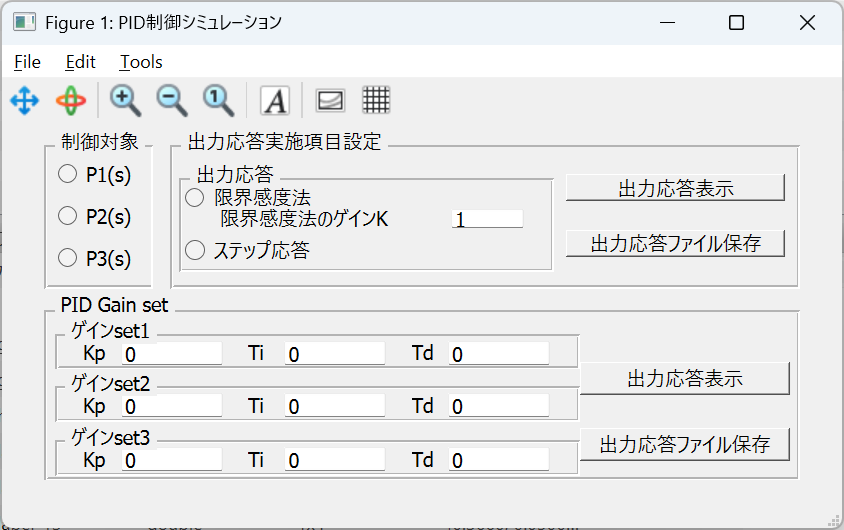
制御対象の伝達関数は以下のとおりです。
$$P1(s)=\dfrac{1}{s(2s+1)(0.5s+1)}$$
$$P2(s)=\dfrac{1}{s(s+2)}$$
$$P3(s)=\dfrac{1}{(s+1)(s+5)}$$
ボタンで選択します。
限界感度法やステップ応答を表示できます。
PIDゲインを設定すると閉ループシミュレーションを実行できます。
  1%Octave ソース : PID制御系設計
  2clear all
  3close all
  4clc
  5
  6pkg load control
  7h.gf=figure("position",[10 300 560 250],"name","PID制御シミュレーション");
  8h.wind=[570 100 560 420];%defaultは[300 200 560 420].4:3
  9                         %640-480
 10
 11h.P1=@() zpk([],[0 -0.5 -2],1);%(z,p,k),1/s(2s+1)(0.5s+1),Q1-P1
 12h.P2=@() tf(1,[1 2 0]);%,1/s(s+2),Q1-P2
 13h.P3=@() zpk([],[-1 -5],1);%(z,p,k),1/(s+1)(s+5)*1,Q2-応答データ取得に使用
 14
 15
 16function prt_fig(fn,fnum)
 17    ext='.png';
 18    fname=["fig_" num2str(fnum) "_" fn ext];
 19    %    print(["fig_" fn "_" num2str(fnum) ".svg"],"-dsvg");
 20    print(fnum, fname,'-dpng','-S640,480');
 21end
 22
 23function [P t_end lab fnum]=set_model(obj,P1_select,P2_select,P3_select)
 24    hs=guidata(obj);
 25    if (P1_select== true)
 26        P=hs.P1();
 27        t_end=[20 40];%開ループ,閉ループsim時間
 28        lab="P1";
 29        fnum=[2 21];%開ループ,閉ループ,図番
 30    elseif (P2_select== true)
 31        P=hs.P2();
 32        t_end=[10 10];
 33        lab="P2";
 34        fnum=[3 31];
 35    elseif (P3_select== true)
 36        P=hs.P3();
 37        t_end=[5 5];
 38        lab="P3";
 39        fnum=[4 41];
 40    else
 41%        H=errordlg("制御対象を選択してください");
 42        H=errordlg("Select Control Object Trans.");
 43        uiwait(H);
 44        %exit;終了してしまう?
 45    end
 46end
 47
 48
 49function [C]=set_pid_cont(KP,TI,TD)
 50    if(TI!=0)
 51        if(TD!=0)
 52            tau=0.1*TD;%Uのグラフを描くためこの形式を使用
 53            C=KP*(1+tf(1,[TI 0])+tf([TD 0],[tau 1]));
 54        else
 55            C=KP*(1+tf(1,[TI 0]));
 56        end
 57    else
 58
 59        if(TD!=0)
 60            tau=0.1*TD;%Uのグラフを描くためこの形式を使用
 61            C=KP*(1+tf([TD 0],[tau 1]));
 62        else
 63            C=KP;
 64        end
 65    end
 66end
 67
 68function [GC UC]=set_close_tf(C,P)
 69    L=C*P;
 70    GC=minreal(L/(1+L));
 71    UC=minreal(C/(1+L));%入力表示
 72end
 73function Time_sim(GCL,UCL, leg,ti,fnum,wind)
 74
 75    cl={[0 0 1],[0 0.51 0],[1 0 0],[0.3  0.74 0.93],[0.49 0.18 0.55],[0.93 0.69 0.12],[0 0.44 0.74],[0.46  0.67 0.18],[0.85  0.32 0.09]};
 76    %bgrcm(紫)ybg(薄緑)r(茶)
 77
 78    %linewidthはpt, 1.5pt=2px,1.125pt=1.5px
 79    lw=1.125;
 80
 81    [c lnum ]=size(leg);%legendの数(入力で),1*lnum
 82    for i=1:lnum
 83        y(:,i)=step(GCL{i},ti);
 84        uin(:,i)=step(UCL{i},ti);
 85    end
 86    figure(fnum,"position",wind)
 87    set(fnum,"position",wind);
 88    clf
 89    figure(fnum);%,"position",wind)
 90
 91    for i=1:lnum
 92        plot(ti,y(:,i),'color',cl{i+3},'linewidth',lw);%rを避けるため+3
 93        hold on
 94    end
 95    set(gca,'xlabel','time s','ylabel','y');
 96
 97    if(lnum==2)
 98        legend(leg{1},leg{2},'location','southeast');
 99    elseif(lnum==3)
100        legend(leg{1},leg{2},leg{3},'location','southeast');
101    elseif(lnum==4)
102        legend(leg{1},leg{2},leg{3},leg{4},'location','southeast');
103    end
104
105    fnum=fnum+1;
106    figure(fnum,"position",wind)
107    set(fnum,"position",wind);
108    clf
109    figure(fnum);%,"position",wind)
110
111    for i=1:lnum
112        plot(ti,uin(:,i),'color',cl{i+3},'linewidth',lw);%rを避けるため+3
113        hold on
114    end
115    set(gca,'xlabel','time s','ylabel','u in');
116
117
118    if(lnum==2)
119        legend(leg{1},leg{2},'location','southeast');
120    elseif(lnum==3)
121        legend(leg{1},leg{2},leg{3},'location','southeast');
122    elseif(lnum==4)
123        legend(leg{1},leg{2},leg{3},leg{4},'location','southeast');
124    end
125end
126
127
128function [r st bl]=get_from_edit(edit_value)
129
130    bl=1;
131    if(size(edit_value)==0)%空白の場合を見つける
132        bl=false;
133    end
134
135    [r st]=str2num(edit_value);%status:数値以外は0,ただし空白でもtrue
136
137    if ((st==false)|| (bl==false))%数値以外は0で戻る
138        r=0;
139    end
140end
141
142function update_plot(obj, init=false)
143    hs=guidata(obj);
144
145    P1_select=get(hs.rbP1,"value");
146    P2_select=get(hs.rbP2,"value");
147    P3_select=get(hs.rbP3,"value");
148
149    lmt_sense=get(hs.rb_lmt,"value");
150    step_method=get(hs.rb_open,"value");
151
152    STEP_res_draw=false;
153    STEP_res_file=false;
154    Q1_STEP_res_draw=false;
155    Q1_STEP_res_file=false;
156
157
158    tag=1;
159    [lmt_gain_gui st(tag) bl(tag)]=get_from_edit(get(hs.rb_lmt_gain_edit,"string"));  tag=tag+1;
160
161    [Lmt_K_val_gui  st(tag) bl(tag)]=get_from_edit(get(hs.Lmt_K_edit,"string")); tag=tag+1;
162    [Lmt_Ti_val_gui st(tag) bl(tag)]=get_from_edit(get(hs.Lmt_Ti_edit,"string")); tag=tag+1;
163    [Lmt_Td_val_gui st(tag) bl(tag)]=get_from_edit(get(hs.Lmt_Td_edit,"string")); tag=tag+1;
164
165    [Step_K_val_gui st(tag) bl(tag)]=get_from_edit(get(hs.Step_K_edit,"string")); tag=tag+1;
166    [Step_Ti_val_gui st(tag) bl(tag)]=get_from_edit(get(hs.Step_Ti_edit,"string")); tag=tag+1;
167    [Step_Td_val_gui st(tag) bl(tag)]=get_from_edit(get(hs.Step_Td_edit,"string")); tag=tag+1;
168
169    [Tune_K_val_gui st(tag) bl(tag)]=get_from_edit(get(hs.Tune_K_edit,"string")); tag=tag+1;
170    [Tune_Ti_val_gui st(tag) bl(tag)]=get_from_edit(get(hs.Tune_Ti_edit,"string")); tag=tag+1;
171    [Tune_Td_val_gui st(tag) bl(tag)]=get_from_edit(get(hs.Tune_Td_edit,"string")); tag=tag+1;
172
173    % get_call_back_object:
174    ## gcbo holds the handle of the control
175    switch (gcbo)
176      case {hs.rbP1} % buttongroupは全イベント起こるので場合分け必要
177        if ( (get(hs.rbP1, "value")==true) && (get(hs.rbP2, "value")==false) &&  (get(hs.rbP3, "value")==false) )
178            P1_select=true;
179            P2_select=false;
180            P3_select=false;
181        else
182            P1_select=false;
183            P2_select=false;
184            P3_select=false;
185        end
186      case {hs.rbP2}
187        if ( (get(hs.rbP1, "value")==false) && (get(hs.rbP2, "value")==true) &&  (get(hs.rbP3, "value")==false) )
188            P2_select=true;
189            P1_select=false;
190            P3_select=false;
191        else
192            P1_select=false;
193            P2_select=false;
194            P3_select=false;
195        end
196      case {hs.rbP3}
197        if ( (get(hs.rbP1, "value")==false) && (get(hs.rbP2, "value")==false) &&  (get(hs.rbP3, "value")==true) )
198            P3_select=true;
199            P1_select=false;
200            P2_select=false;
201        else
202            P1_select=false;
203            P2_select=false;
204            P3_select=false;
205        end
206
207
208      case {hs.rb_lmt}
209        if ( (get(hs.rb_lmt, "value")==true) && (get(hs.rb_open, "value")==false))
210            lmt_sense=true;
211            step_method=false;
212        else
213            lmt_sense=false;
214            step_method=false;
215        end
216      case {hs.rb_open}
217        if ( (get(hs.rb_open, "value")==true) && (get(hs.rb_lmt, "value")==false))
218            step_method=true;
219            lmt_sense=false;
220        else
221            lmt_sense=false;
222            step_method=false;
223        end
224      case {hs.rb_lmt_gain_edit}
225        tag=1;
226        [lmt_gain_gui st(tag) bl(tag)]=get_from_edit(get(gcbo,"string"));
227        STEP_res_draw=true;
228      case {hs.STEP_res_button}
229        STEP_res_draw=true;
230      case {hs.STEP_res_file_button}
231        STEP_res_file=true;
232      case {hs.STEP_res_button_1}
233        Q1_STEP_res_draw=true;
234      case {hs.STEP_res_file_button_1}
235        Q1_STEP_res_file=true;
236      case {hs.Step_K_edit}
237        tag=5;
238        [Step_K_val_gui st(tag) bl(tag)]=get_from_edit(get(gcbo, "string"));
239      case {hs.Step_Ti_edit}
240        tag=6;
241        [Step_Ti_val_gui st(tag) bl(tag)]=get_from_edit(get(gcbo, "string"));
242      case {hs.Step_Td_edit}
243        tag=7;
244        [Step_Td_val_gui st(tag) bl(tag)]=get_from_edit(get(gcbo, "string"));
245
246      case {hs.Tune_K_edit}
247        tag=8;
248        [Tune_K_val_gui st(tag) bl(tag)]=get_from_edit(get(gcbo, "string"));
249      case {hs.Tune_Ti_edit}
250        tag=9;
251        [Tune_Ti_val_gui st(tag) bl(tag)]=get_from_edit(get(gcbo, "string"));
252      case {hs.Tune_Td_edit}
253        tag=10;
254        [Tune_Td_val_gui st(tag) bl(tag)]=get_from_edit(get(gcbo, "string"));
255
256    end %end of case
257
258    if (min(bl)==0)
259        %        msgbox("PIDパラメータに空白の設定を発見しましたので0としました","注意")
260        msgbox("FOUND blank term in PID pars.,  treated as zero.","caution");
261    end
262    if (min(st)==0)
263        %        msgbox("PIDパラメータに数値以外の設定を発見しましたので0としました","注意")
264        msgbox("FOUND non number on PID pars., treated as zero","caution");
265    end
266
267    if((STEP_res_draw==true) || (STEP_res_file==true))
268
269        if((step_method==false) && (lmt_sense==false))
270            %            H=errordlg("出力応答方法を選択してください");
271            H=errordlg("Set OUTPUT method","caution");
272            uiwait(H);
273            return
274        end
275
276
277        [P tnum lab fnum]=set_model(obj,P1_select,P2_select,P3_select);
278        %tnum=[開ループsim時間 閉ループsim時間]
279        dt=0.01;
280        ti=[0:dt:tnum(1)];
281
282        if(lmt_sense==true)
283            L=lmt_gain_gui*P;
284            G=L/(1+L);
285            fn=fnum(1);%lmd/stpで図番変える
286                       %msgbox(["制御対象" lab "の限界感度法実施"],"出力応答実施");
287            msgbox(["Exec limit sens. method using " lab ],"OUTPUT");
288        elseif(step_method==true)
289            G=P;
290            fn=fnum(1)*10;
291            %            msgbox(["制御対象" lab "のステップ応答実施"],"出力応答実施");
292            msgbox(["STEP resp. using " lab ],"OUTPUT");
293        else
294            return
295        end
296        %PID設計用の出力応答を見る時はfnumはPによって変える@set_model
297        fh=figure(fn);%,"position",hs.wind);
298        set(fh,"position",hs.wind);
299        figure(fn)
300        step(G,ti);
301        legend("off");
302
303        if(STEP_res_file==true)
304            prt_fig(["OUT_res_" lab ],fn);%lab:P1,P2,P3
305            %            msgbox(["fig\\_" num2str(fn) "\\_OUT\\_res.pngで保存しました"],"案内");
306            msgbox(["Saved as fig\\_" num2str(fn) "\\_OUT\\_res\\_" lab ".png"],"Announce");
307            %uiwaitなしでmsgboxを連続すると、別windowが開くが、スルーする
308        end
309
310    end % end of 出力応答
311
312    %pid制御器設計
313    c_lmt=set_pid_cont(Lmt_K_val_gui,Lmt_Ti_val_gui,Lmt_Td_val_gui);
314    c_step=set_pid_cont(Step_K_val_gui,Step_Ti_val_gui,Step_Td_val_gui);
315    c_tune=set_pid_cont(Tune_K_val_gui,Tune_Ti_val_gui,Tune_Td_val_gui);
316    if((Q1_STEP_res_draw==true) || (Q1_STEP_res_file==true))
317        [P tnum lab fnum]=set_model(obj,P1_select,P2_select,P3_select);
318%        msgbox(["制御対象は" lab "(s)です"]);
319        msgbox([lab "(s) is Control object"]);
320        %tnum=[開ループsim時間 閉ループsim時間]
321        dt=0.01;
322        ti=[0:dt:tnum(2)];
323        [GC{1} UC{1}]=set_close_tf(c_lmt,P);
324        [GC{2} UC{2}]=set_close_tf(c_step,P);
325        [GC{3} UC{3}]=set_close_tf(c_tune,P);
326
327        leg={"set1","set2","set3"};%1*3
328
329        Time_sim(GC, UC, leg,ti,fnum(2),hs.wind);
330
331        if(Q1_STEP_res_file==true)
332            prt_fig(["Q1_" lab],fnum(2));%lab:P1,or,P2
333            prt_fig(["Q1_" lab],fnum(2)+1);%制御入力
334            fnbody=["\\_Q1\\_" lab ".png"];
335            %            msgbox(["fig\\_" num2str(fnum(2)) fnbody "と\n fig\\_" num2str(fnum(2)+1) fnbody "で保存しました"]);
336            msgbox(["Saved as fig\\_" num2str(fnum(2)) fnbody "and\n fig\\_" num2str(fnum(2)+1) fnbody ],"Success");
337
338        end
339
340    end
341end
342
343
344gp = uibuttongroup ("title","制御対象","Position", [ 0.05 0.56 0.13 0.43]);
345
346%## Create a buttons in the group
347h.rbP1 = uicontrol (
348		    "parent", gp,
349		    "style", "radiobutton",
350		    "units", "normalized",
351		    "string", "P1(s)",
352		    "value", false,
353		    "horizontalalignment", "left",
354		    "Position", [ 0.1 0.7 0.8 0.2 ],
355		    "callback",@update_plot);
356h.rbP2 = uicontrol (
357		    "parent", gp,
358		    "style", "radiobutton",
359		    "units", "normalized",
360		    "string", "P2(s)",
361		    "value", false,
362		    "horizontalalignment", "left",
363		    "Position", [ 0.1 0.4 0.8 0.2 ],
364		    "callback",@update_plot);
365h.rbP3 = uicontrol (
366		    "parent",gp,
367		    "style", "radiobutton",
368		    "units", "normalized",
369		    "string", "P3(s)",
370		    "value", false,
371		    "horizontalalignment", "left",
372		    "Position", [ 0.1 0.1 0.8 0.2 ],
373		    "callback",@update_plot);
374% b1/b2/b3いずれかだけ
375
376
377h.Menu=uipanel("title","出力応答実施項目設定","position",[0.2 0.56 0.75 0.43]);
378
379gp2 = uibuttongroup (h.Menu, "title","出力応答","Position", [ 0.01 0.1 0.6 0.8]);
380
381%## Create a buttons in the group
382h.rb_lmt = uicontrol (
383		    "parent", gp2,
384		    "style", "radiobutton",
385		    "units", "normalized",
386		    "string", "限界感度法",
387		    "value", false,
388%		    "callback",@update_plot,
389		    "horizontalalignment", "left",
390		    "Position", [ 0.01 0.7 0.7 0.22 ]);
391
392h.rb_open = uicontrol (
393		    "parent", gp2,
394		    "style", "radiobutton",
395		    "units", "normalized",
396		    "string", "ステップ応答",
397		    "value", false,
398%		    "callback",@update_plot,
399		    "horizontalalignment", "left",
400		    "Position", [ 0.01 0.1 0.7 0.22 ]);
401
402h.rb_lmt_label = uicontrol (
403		    "parent", gp2,
404		    "style", "text",
405		    "units", "normalized",
406		    "string", "限界感度法のゲインK",
407		    "value", false,
408%		    "callback",@update_plot,
409		    "horizontalalignment", "left",
410		    "Position", [ 0.1 0.45 0.62 0.22 ]);
411
412h.rb_lmt_gain_edit = uicontrol (
413		    "parent", gp2,
414		    "style", "edit",
415		    "units", "normalized",
416		    "string", "1",
417%		    "value", "",
418		    "horizontalalignment", "left",
419		    "Position", [ 0.73 0.45 0.2 0.22 ],
420		    "callback",@update_plot);
421
422h.STEP_res_button=uicontrol(
423    "parent",h.Menu,
424    "style","pushbutton",
425    "units", "normalized",
426    "string","出力応答表示",
427    "callback", @update_plot,
428    "horizontalalignment", "left",
429    "position", [0.63 0.6 0.35 0.2]);
430
431h.STEP_res_file_button=uicontrol(
432    "parent",h.Menu,
433    "style","pushbutton",
434    "units", "normalized",
435    "string","出力応答ファイル保存",
436    "callback", @update_plot,
437    "horizontalalignment", "left",
438    "position", [0.63 0.2 0.35 0.2]);
439
440
441h.Q1=uipanel("title","PID Gain set","position",[0.05 0.05 0.9 0.5]);
442
443p_x_pos=0.01;
444p_y_pos=0.65;
445p_width=0.7;
446p_l_width=p_width/10 ;%label_width
447p_e_width=p_l_width*2.8;%editbox_width
448p_height=0.32;
449
450
451h.Lmt=uipanel("parent",h.Q1,
452	      "title","ゲインset1","position",[p_x_pos p_y_pos p_width p_height]);
453h.Step=uipanel("parent",h.Q1,
454	       "title","ゲインset2","position",[p_x_pos p_y_pos-p_height p_width p_height]);
455h.Tune=uipanel("parent",h.Q1,
456	       "title","ゲインset3","position",[p_x_pos p_y_pos-p_height*2 p_width p_height]);
457
458
459
460h.STEP_res_button_1=uicontrol(
461    "parent",h.Q1,
462    "style","pushbutton",
463    "units", "normalized",
464    "string","出力応答表示",
465    "callback", @update_plot,
466    "horizontalalignment", "left",
467    "position", [0.71 0.5 0.28 0.2]);
468h.STEP_res_file_button_1=uicontrol(
469    "parent",h.Q1,
470    "style","pushbutton",
471    "units", "normalized",
472    "string","出力応答ファイル保存",
473    "callback", @update_plot,
474    "horizontalalignment", "left",
475    "position", [0.71 0.1 0.28 0.2]);
476
477%label_mn:m行n列
478label_11=[0.05 0.05 p_l_width 0.8];
479label_12=[0.05+p_l_width 0.05 p_e_width 0.8];
480label_13=[0.1+p_l_width+p_e_width*1 0.05 p_l_width 0.8];
481label_14=[0.1+p_l_width*2+p_e_width*1 0.05 p_e_width 0.8];
482label_15=[0.15+p_l_width*2+p_e_width*2 0.05 p_l_width 0.8];
483label_16=[0.15+p_l_width*3+p_e_width*2 0.05 p_e_width 0.8];
484label_btn=[0.75 0.1 0.2 0.2];
485
486h.Lmt_K_label=uicontrol(
487    "parent",h.Lmt,
488    "style","text",
489    "units", "normalized",
490    "string","Kp",
491%    "callback", @update_plot,
492    "horizontalalignment", "left",
493    "position", label_11);
494h.Lmt_K_edit=uicontrol(
495    "parent",h.Lmt,
496    "style","edit",
497    "units", "normalized",
498    "string","0",
499    "callback", @update_plot,
500    "horizontalalignment", "left",
501    "position", label_12);
502
503h.Lmt_Ti_label=uicontrol(
504    "parent",h.Lmt,
505    "style","text",
506    "units", "normalized",
507    "string","Ti",
508%    "callback", @update_plot,
509    "horizontalalignment", "left",
510    "position", label_13);
511h.Lmt_Ti_edit=uicontrol(
512    "parent",h.Lmt,
513    "style","edit",
514    "units", "normalized",
515    "string","0",
516    "callback", @update_plot,
517    "horizontalalignment", "left",
518    "position", label_14);
519h.Lmt_Td_label=uicontrol(
520    "parent",h.Lmt,
521    "style","text",
522    "units", "normalized",
523    "string","Td",
524%    "callback", @update_plot,
525    "horizontalalignment", "left",
526    "position", label_15);
527h.Lmt_Td_edit=uicontrol(
528    "parent",h.Lmt,
529    "style","edit",
530    "units", "normalized",
531    "string","0",
532    "callback", @update_plot,
533    "horizontalalignment", "left",
534    "position", label_16);
535
536h.Step_K_label=uicontrol(
537    "parent",h.Step,
538    "style","text",
539    "units", "normalized",
540    "string","Kp",
541%    "callback", @update_plot,
542    "horizontalalignment", "left",
543    "position", label_11);
544h.Step_K_edit=uicontrol(
545    "parent",h.Step,
546    "style","edit",
547    "units", "normalized",
548    "string","0",
549    "callback", @update_plot,
550    "horizontalalignment", "left",
551    "position", label_12);
552
553h.Step_Ti_label=uicontrol(
554    "parent",h.Step,
555    "style","text",
556    "units", "normalized",
557    "string","Ti",
558%    "callback", @update_plot,
559    "horizontalalignment", "left",
560    "position", label_13);
561h.Step_Ti_edit=uicontrol(
562    "parent",h.Step,
563    "style","edit",
564    "units", "normalized",
565    "string","0",
566    "callback", @update_plot,
567    "horizontalalignment", "left",
568    "position", label_14);
569
570h.Step_Td_label=uicontrol(
571    "parent",h.Step,
572    "style","text",
573    "units", "normalized",
574    "string","Td",
575%    "callback", @update_plot,
576    "horizontalalignment", "left",
577    "position", label_15);
578h.Step_Td_edit=uicontrol(
579    "parent",h.Step,
580    "style","edit",
581    "units", "normalized",
582    "string","0",
583    "callback", @update_plot,
584    "horizontalalignment", "left",
585    "position", label_16);
586
587
588h.Tune_K_label=uicontrol(
589    "parent",h.Tune,
590    "style","text",
591    "units", "normalized",
592    "string","Kp",
593%    "callback", @update_plot,
594    "horizontalalignment", "left",
595    "position", label_11);
596h.Tune_K_edit=uicontrol(
597    "parent",h.Tune,
598    "style","edit",
599    "units", "normalized",
600    "string","0",
601    "callback", @update_plot,
602    "horizontalalignment", "left",
603    "position", label_12);
604
605h.Tune_Ti_label=uicontrol(
606    "parent",h.Tune,
607    "style","text",
608    "units", "normalized",
609    "string","Ti",
610%    "callback", @update_plot,
611    "horizontalalignment", "left",
612    "position", label_13);
613h.Tune_Ti_edit=uicontrol(
614    "parent",h.Tune,
615    "style","edit",
616    "units", "normalized",
617    "string","0",
618    "callback", @update_plot,
619    "horizontalalignment", "left",
620    "position", label_14);
621h.Tune_Td_label=uicontrol(
622    "parent",h.Tune,
623    "style","text",
624    "units", "normalized",
625    "string","Td",
626%    "callback", @update_plot,
627    "horizontalalignment", "left",
628    "position", label_15);
629h.Tune_Td_edit=uicontrol(
630    "parent",h.Tune,
631    "style","edit",
632    "units", "normalized",
633    "string","0",
634    "callback", @update_plot,
635    "horizontalalignment", "left",
636    "position", label_16);
637
638set(h.gf, "color", get(h.gf, "defaultuicontrolbackgroundcolor"));
639guidata(h.gf,h);
640update_plot(h.gf,true);